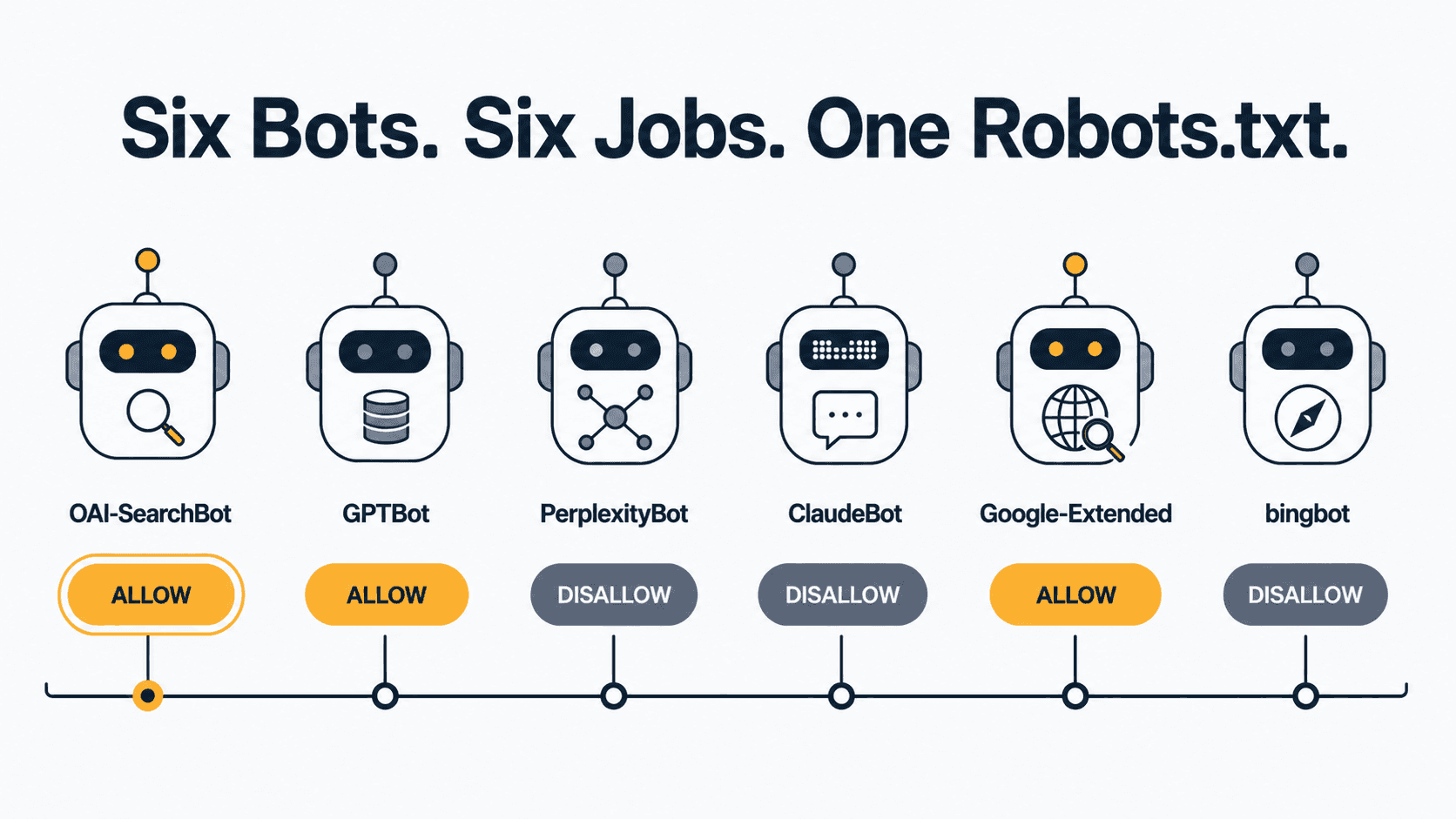
Checking whether AI bots can crawl your site means auditing six separate crawlers — OAI-SearchBot, GPTBot, PerplexityBot, ClaudeBot, Google-Extended, and Bingbot — against your robots.txt, since each one controls a different access type (training versus retrieval) independently. Confirm each bot’s exact user-agent token is allowed, then verify with server logs, not a robots.txt read-through alone.
Most guides tell you to “make sure AI bots can crawl your site.” That’s the diagnosis. This is AI crawler access verification, not guesswork — which bots to check, what their exact user-agent strings are, how to verify whether each is allowed or blocked, and what to do if it isn’t. OAI-SearchBot is not GPTBot. Get that wrong and you’ll unblock the training crawler while leaving the retrieval crawler blocked — and you still won’t show up when someone asks ChatGPT about you.
This is the prerequisite layer. Before you touch schema configuration or worry about entity recognition, the bots have to physically be able to reach your pages. If you haven’t run the full AI search visibility diagnostic yet, this is step one of it.
The Six Bots You Actually Need to Check
Six crawlers, six different jobs, six independent robots.txt controls. Here’s the current state of each, verified against each platform’s own documentation:
| Platform | Bot (robots.txt token) | What it does |
|---|---|---|
| OpenAI — search | OAI-SearchBot | Surfaces your pages in ChatGPT search results. Not used for training. |
| OpenAI — training | GPTBot | Collects content that may train future foundation models. |
| Perplexity — index | PerplexityBot | Builds the index Perplexity cites answers from. Not used for training. |
| Anthropic — training | ClaudeBot | Collects content that could contribute to future Claude model training. |
| Google — training | Google-Extended | Opt-out for Gemini/Vertex AI training and grounding. Not a separate search crawler. |
| Microsoft — search + Copilot | bingbot | Feeds the Bing index that Copilot answers draw from. |
OpenAI uses OAI-SearchBot and GPTBot independently — a webmaster can allow OAI-SearchBot to appear in search results while disallowing GPTBot to keep crawled content out of foundation model training. That single sentence is the whole article in miniature, and it’s also where most audits go wrong.
A quick gut check before you trust any of this: Google itself warns that HTTP user-agent strings can be spoofed — anyone can set a header to say “GPTBot” in about four seconds, including bots that have never been within a hundred miles of an OpenAI engineer. Token matching in robots.txt is necessary. It is not sufficient. IP verification (covered below) is what actually proves the request came from who it claims to.
OAI-SearchBot vs. GPTBot: Why This Distinction Breaks Most Robots.txt Audits
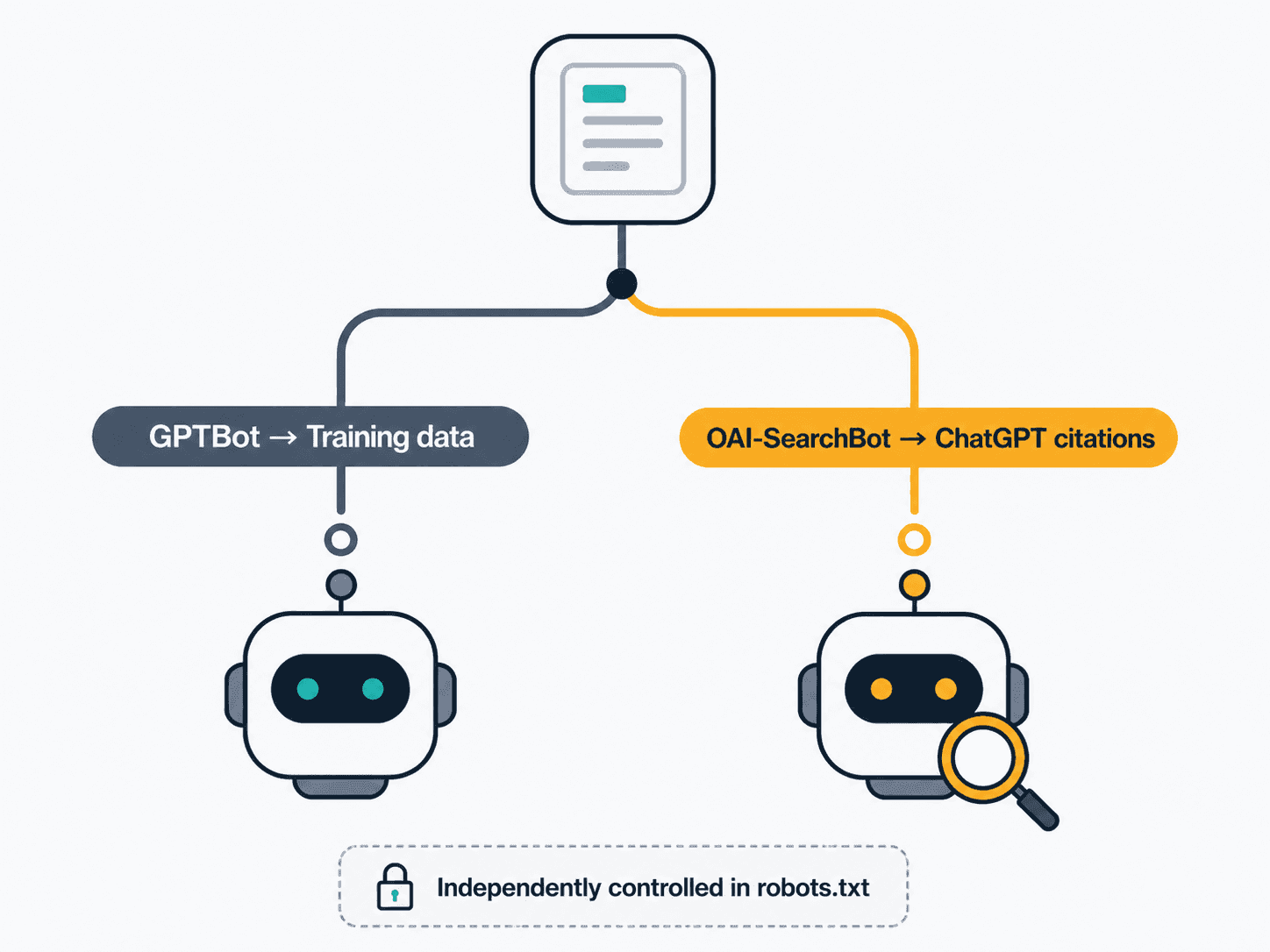
Here’s the failure mode in practice. A site blocks GPTBot in 2024 to keep its content out of AI training — reasonable decision, widely recommended at the time. Two years later, the same Disallow: / line is still sitting in robots.txt, except now it’s also catching OAI-SearchBot, because whoever wrote the original rule used a wildcard or just never separated the two. OpenAI exposes separate robots.txt controls specifically so a site can allow AI search inclusion while blocking model training — but that only works if your robots.txt actually has two distinct User-agent: blocks instead of one that accidentally covers both.
The same pattern now applies to Anthropic. As of a February 2026 documentation update, Anthropic operates three distinct bots — ClaudeBot for training, Claude-User for user-initiated fetches, and Claude-SearchBot for indexing search results — each independently controllable. If your robots.txt still has a single line for “ClaudeBot” written before this split existed, you may be blocking more (or less) than you think you are.
Perplexity runs a similar pair: PerplexityBot for indexing, and a separate Perplexity-User agent that fires when someone pastes your URL directly into a Perplexity conversation. Perplexity-User generally ignores robots.txt entirely, since it’s responding to a direct, real-time user request rather than crawling — which means blocking it in robots.txt mostly just makes you feel like you did something.
The gap this creates at scale is measurable: one analysis of 66.7 billion bot requests found OpenAI’s search-crawler coverage growing from 4.7% to over 55% of sampled sites between 2024 and 2026, while its training-crawler coverage dropped from 84% to 12% over the same window — strong evidence that sites are actively making this OAI-SearchBot/GPTBot split on purpose now, not leaving it to whatever the default happened to be in 2024.
How to Check If AI Bots Are Blocked by Your Robots.txt
Three steps, in order:
- Read robots.txt directly. Visit
yourdomain.com/robots.txtin a browser. Look for aUser-agent:line matching each of the six tokens above, plusDisallow: /orDisallow:underneath it. No matching block means the bot falls under yourUser-agent: *rule by default — usually allowed, unless that wildcard rule itself disallows everything. - Cross-check against the wildcard group. A site-wide
User-agent: * / Disallow: /blocks every bot that doesn’t have its own explicitAllowoverride, including ones you’ve never heard of. This is the single most common reason a site thinks it allowed AI crawlers and didn’t. - Verify in server logs, not just robots.txt. Grep your access logs for the user-agent tokens above over a 7–14 day window. If a bot is allowed in robots.txt but never shows up in logs, either it hasn’t found your site yet, or something upstream (a WAF, a bot-management product, a CDN rule) is silently blocking it before robots.txt is even consulted. Robots.txt only stops well-behaved bots that choose to read it — it has no enforcement power against your own infrastructure.
For verification beyond user-agent string matching — since, again, those can be spoofed — match the requesting IP against each platform’s published range: openai.com/searchbot.json, openai.com/gptbot.json, perplexity.com/perplexitybot.json. Anthropic is the outlier here too: it doesn’t currently publish IP ranges the way OpenAI and Perplexity do, so IP-level verification of ClaudeBot traffic isn’t available the same way — you’re working from user-agent string and behavior pattern alone.
What Allow vs. Block Actually Looks Like in Robots.txt
# Allow ChatGPT search citations, block training
User-agent: OAI-SearchBot
Allow: /
User-agent: GPTBot
Disallow: /

# Allow Perplexity indexing
User-agent: PerplexityBot
Allow: /

# Allow Claude search indexing, block training
User-agent: Claude-SearchBot
Allow: /
User-agent: ClaudeBot
Disallow: /

# Opt out of Gemini training without affecting Search inclusion
User-agent: Google-Extended
Disallow: /

# Standard search crawlers — leave open
User-agent: Googlebot
Allow: /
User-agent: bingbot
Allow: /
This configuration is a citation-maximizing, training-minimizing stance: it keeps the site visible across every major AI answer engine while opting out of content being absorbed into future model weights. Adjust per your own risk tolerance — there’s no universally “correct” setting, just a trade-off between citation reach and training exposure that only you can weigh.
How to Allow AI Crawlers on Your Site
- Locate your robots.txt file. It lives at the root of your domain —
yourdomain.com/robots.txt. Most CMS platforms (WordPress, Webflow, Shopify) expose an editor for this under SEO settings; for static or custom sites, it’s a plain text file in your web root. - Add an explicit
Allowblock for each bot you want. Don’t rely on a bareUser-agent: * / Allow: /and assume it covers everything — some bot-management and security plugins inject their own AI-bot blocking rules that override the wildcard. Add the six tokens explicitly. - Check for upstream blocks before you trust the file. Cloudflare, Sucuri, and most managed-WordPress hosts ship with an “AI bot blocking” toggle, separate from robots.txt entirely, often defaulted to on. Your robots.txt can say “Allow” and the bot still gets a 403 if this toggle is active.
- Deploy and wait. Expect roughly 24 hours for OpenAI’s systems to reflect a robots.txt change for search results; Perplexity states the same up-to-24-hour window. Don’t re-test five minutes after deploying and conclude the fix didn’t work.
- Confirm via server logs after the propagation window. Re-run the log check from the previous section. You should see actual crawl hits from the bots you allowed within a few days of the change going live.
llms.txt: A Second Signal Layer
Worth setting expectations honestly here, because the AI citation industry has not been honest about this one. llms.txt — proposed by Jeremy Howard in September 2024, spec hosted at llmstxt.org — is a plain-Markdown file at your domain root that gives AI systems a curated, human-written summary of what your site is and which pages matter most. The pitch is reasonable: robots.txt controls access, llms.txt adds editorial context robots.txt was never designed to carry.
The honest 2026 data point: major AI search and answer crawlers — GPTBot, ClaudeBot, PerplexityBot, OAI-SearchBot, Google-Extended — largely don’t fetch it in meaningful volume yet, and Google has stated directly that it does not support llms.txt for AI Overview or AI Mode inclusion. Where it does get real use is the IDE and coding-agent layer — tools like Cursor, Claude Code, and GitHub Copilot routinely check for it on documentation sites. So: don’t sell it internally as a citation-rate lever. It’s closer to a README for the agentic web — near-zero cost, real but narrow upside, worth shipping anyway. The minimal version is a one-paragraph # Your Site Name header, a one-sentence blockquote summary, and links to your three to five most important pages with one-line descriptions each. For the full crawler-data breakdown by platform, see do you need an llms.txt file?
Common Mistakes in AI Crawler Audits
Blocking Google-Extended expecting it to keep you out of AI Overviews. It won’t — Google-Extended has no separate crawler of its own; it rides on Googlebot’s existing requests and governs only Gemini app training and grounding, with no effect on Search inclusion or ranking, AI Overviews included. If your goal is staying out of AI Overviews specifically, robots.txt isn’t the tool — that requires the nosnippet meta tag, which also strips your regular search snippets.
Treating “ClaudeBot” as one bot. It’s three now, each independently controllable, and the split is recent enough that plenty of robots.txt files written before February 2026 haven’t caught up.
Assuming a wildcard Disallow: / from years ago doesn’t apply to AI bots. It does, unless a specific Allow block overrides it for that exact token.
Skipping the IP verification step. User-agent strings prove nothing on their own. A spoofed scraper claiming to be GPTBot looks identical in a casual log grep.
Confusing robots.txt with content visibility. Robots.txt governs whether a bot fetches a page, not whether the page’s content is well-structured enough to be extracted and cited once fetched. That’s a separate layer — the schema configuration step comes after this one, not instead of it.
If you’ve worked through the table and the verification steps above, the fastest next move isn’t another tool — it’s your own server logs. Pull the last two weeks, grep for the six tokens, and you’ll know within ten minutes whether the bots you think you’ve allowed are actually showing up.
Frequently Asked Questions
What bots do AI search engines use to crawl websites?
Each major AI platform runs its own dedicated crawler, separate from the bots used for AI model training. OpenAI uses OAI-SearchBot for ChatGPT search citations and GPTBot for training data collection. Perplexity uses PerplexityBot. Anthropic uses Claude-SearchBot for indexing and ClaudeBot for training, plus Claude-User for live, user-triggered fetches. Google doesn’t run a separate AI search crawler — AI Overviews draw from the same Googlebot-fed index as regular Search. Microsoft’s Bingbot feeds both Bing Search and Copilot answers from a single index.
What’s the difference between OAI-SearchBot and GPTBot?
OAI-SearchBot indexes your content so it can be surfaced and cited in ChatGPT’s search results, while GPTBot collects content that may be used to train OpenAI’s foundation models — two entirely different jobs controlled by two separate robots.txt rules. OpenAI’s own documentation confirms these settings work independently: a site can allow OAI-SearchBot for citation visibility while disallowing GPTBot to keep content out of training data, or block both, or allow both. Most sites that want AI citation reach without contributing to model training should allow OAI-SearchBot and disallow GPTBot specifically. The most common error is treating “AI bot” as one setting and writing a single robots.txt rule that accidentally catches both — either blocking citation visibility you wanted to keep, or training on content you meant to protect.
How do I allow AI crawlers on my site?
Add explicit User-agent blocks with Allow: / rules to your robots.txt file for each bot you want to permit — OAI-SearchBot, PerplexityBot, Claude-SearchBot, Googlebot, and bingbot, at minimum, plus GPTBot and ClaudeBot if you also want to allow training access. Don’t rely on a bare wildcard User-agent: * / Allow: / rule and assume it covers everything: many CDN, WAF, and managed-hosting security plugins inject their own AI-bot-blocking rules that operate independently of robots.txt and silently override it. Deploy the change, then wait roughly 24 hours for OpenAI and Perplexity’s systems to re-read the updated file before testing. Confirm the fix actually worked by checking server logs for real crawl activity from each bot’s user-agent token, not just by re-reading robots.txt — the file changing doesn’t prove the platform has acted on it yet.
How do I check if AI bots are blocked by my robots.txt?
Visit yourdomain.com/robots.txt directly in a browser and look for a Disallow rule under each bot’s specific user-agent token — OAI-SearchBot, GPTBot, PerplexityBot, ClaudeBot, Claude-SearchBot, Google-Extended, and bingbot. Also check your wildcard User-agent: * group, since any bot without its own explicit block falls under that default rule, which is the single most common reason a site thinks it’s allowing AI crawlers and isn’t. Reading the file only tells you what should happen, though — verify against server logs over a one-to-two-week window to confirm the bots are actually showing up. If a bot is allowed in robots.txt but absent from logs, check for upstream blocks: CDN rules, WAF settings, or security plugins can silently reject a bot before robots.txt is ever consulted, and robots.txt has no power to override that.
Does blocking GPTBot affect whether ChatGPT cites my site?
No — and this is the core confusion this entire topic exists to clear up. Disallowing GPTBot only opts your content out of OpenAI’s foundation model training datasets; it has no effect on ChatGPT’s search feature. ChatGPT’s search citations are powered by OAI-SearchBot, a completely separate, independently controlled crawler with its own robots.txt rule. You can block GPTBot entirely and still appear in ChatGPT search results, as long as OAI-SearchBot remains allowed and your server isn’t silently rejecting it upstream. The reverse mistake is just as common: sites that allow GPTBot assuming it covers search visibility, while their wildcard rule or a security plugin is quietly blocking OAI-SearchBot the whole time.
Is llms.txt required, or just robots.txt?
Robots.txt is the access-control layer, and it’s effectively required — it’s the file that determines whether AI bots can reach your content at all. llms.txt is optional editorial context that sits on top of it: a curated, human-written summary of what your site is and which pages matter most. As of mid-2026, the major AI search and answer crawlers — GPTBot, ClaudeBot, PerplexityBot, OAI-SearchBot, Google-Extended — largely don’t fetch llms.txt in meaningful volume for citation purposes, and Google has stated directly that it doesn’t use llms.txt for AI Overview or AI Mode inclusion. Where it does see real adoption is the IDE and coding-agent layer. Get robots.txt right first; treat llms.txt as a low-cost addition, not a substitute.
How long does a robots.txt change take to reflect in AI search results?
Plan for roughly 24 hours for both OpenAI and Perplexity to re-crawl and reflect a robots.txt update in their search-facing systems — both platforms state this window explicitly in their own documentation. Don’t test immediately after deploying a change and conclude it failed; the propagation delay is normal and expected. Once the window has passed, verify the fix worked by checking server logs for actual crawl activity from the relevant bot’s user-agent token, rather than just re-reading the robots.txt file itself — the file updating successfully doesn’t confirm the platform has re-read and acted on it yet. If a bot still isn’t appearing in logs after 48–72 hours, check for upstream blocks at the CDN or WAF level before assuming the robots.txt syntax itself is wrong.
If bot access is where your citation gap actually lives, Citation Infrastructure Setup fixes robots.txt, schema, and llms.txt in one pass.
See Citation Infrastructure Setup — $397 →